open source · Apache-2.0
mod_pagespeed, the PageSpeed module for nginx and Apache Lighthouse 56 to 90. On your own servers.
mod_pagespeed transcodes images to AVIF, minifies CSS and JS, and injects critical CSS — optimized off the request path, served from cache by your own nginx or Apache. Open source under the Apache License 2.0. No proxy, no CDN, nothing third-party in your request path.
Running IIS or ASP.NET Core? see the IIS and ASP.NET Core packages →
The optimization core behind 230,000+ live sites (BuiltWith, May 2026) — maintained by We-Amp.
Free to install and run, in development and in production.
No per-image or per-request metering like a CDN. Support from the people who build it is what’s for sale. See support plans →
Readout · demo store
see it live56 to 90
Lighthouse performance score
1.8s to 0.8s
page load, cut in half (simulated 3G)
−76%
product image, JPEG → AVIF
0
third parties in the request path
Built by We-Amp — the team that helped build ngx_pagespeed and maintains mod_pagespeed today.
mod_pagespeed is developed by We-Amp B.V. and is not affiliated with or endorsed by Google. mod_pagespeed is an open-source project originally developed at Google.
01 Running on our own sites
Running on our own sites
HTTP/1.1 200
content-type: text/html
content-length: 32688
x-mod-pagespeed: 2.8.0
vary: User-Agent,Accept-Encoding,Save-Data
content-encoding: gzip
cache-control: max-age=0, no-cache
captured 2026-11-05
In the reverse-proxy deployment, the module adds
x-pagespeed: HIT
or
x-pagespeed: MISS
to the response.
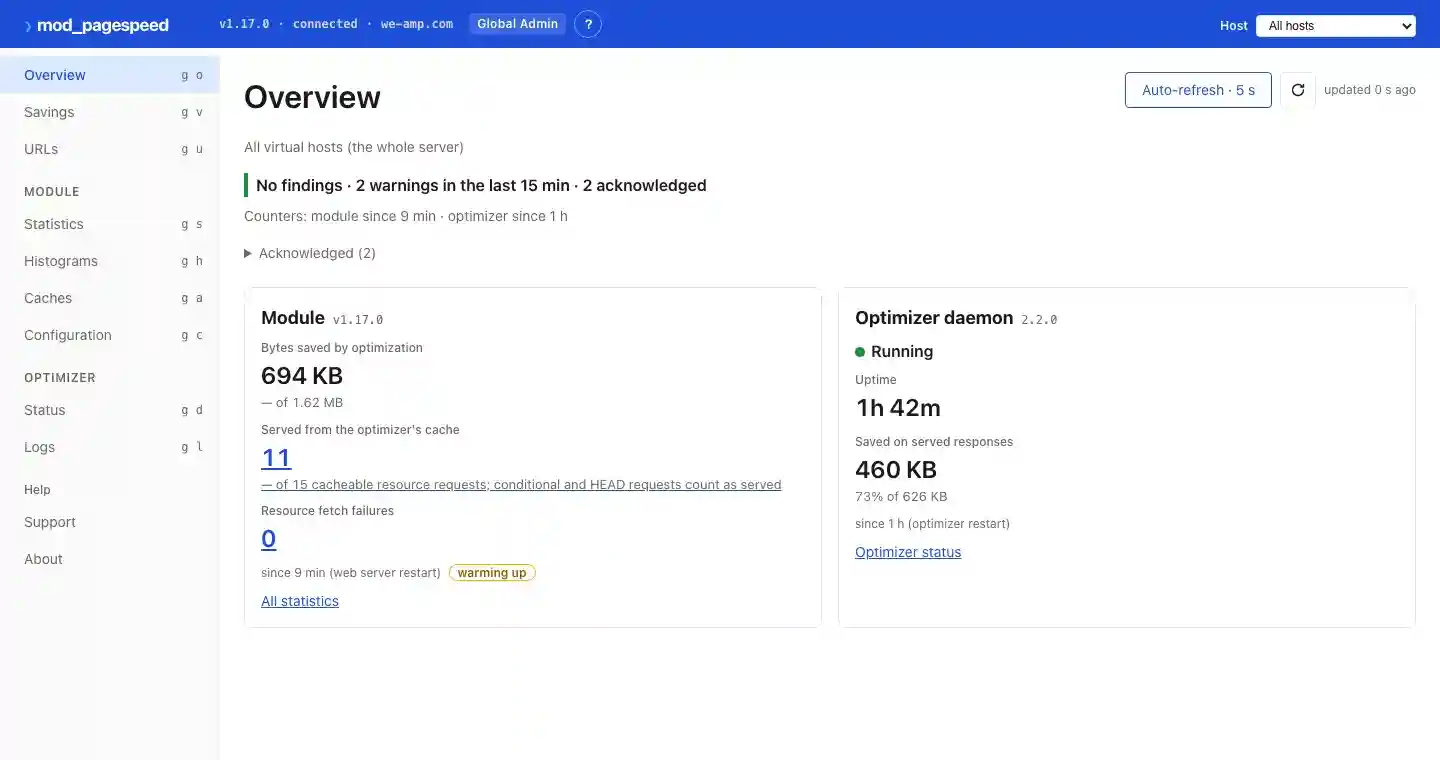
We run every We-Amp site through it.
We run our own sites, this page included, through mod_pagespeed — the binary serving this page is the binary we ship. Same Cyclone cache. Check the response headers. On our own demo sites we measure up to 69% smaller pages.
02 Module + worker
One product again. The module you know, plus the worker.
Pick by your stack
- Apache native module + worker → mod_pagespeed (this page)
- nginx native module, and module + worker in the reverse-proxy deployment → mod_pagespeed (this page)
- IIS / Windows Server → the IIS module — the IIS package ships as a signed installer on the mod_pagespeed GitHub release
- ASP.NET Core → the ASP.NET Core middleware (WeAmp.PageSpeed.AspNetCore)
Every line shares the same optimization core; the converged module keeps the 1.14/1.15 directives, so existing configuration carries over.
mod_pagespeed
One product, two parts — open source under the Apache License 2.0
- Native in-process module — no proxy hop; drop-in for your pagespeed.conf
- Optimizer worker off the request path — ML quality + SSIMULACRA2 verification
- Classic filters: combine, sprite, IPRO, domain mapping
-
Built-in
/pagespeed_admin/console - Serving straight from the variant-aware cache — no re-optimization on the request path
- Transform packs: the free edge-SEO pack lets you set canonicals, titles, descriptions, hreflang and JSON-LD at serve time, starting in report mode. See the packs.
03 Signal path
The worker optimizes off the request path. The module serves from cache.
x-pagespeed: HIT
hash lookup + mmap pointer
x-pagespeed: MISS
original served, worker queued
04 Procedure
Install. Configure. Verify.
STEP 1 apt / yum
Install
A native module for your existing web server.
apt install the signed
mod-pagespeed (Apache)
or
nginx-module-pagespeed
(nginx) — prebuilt, nothing to compile. The optimizer worker installs alongside as
pagespeed-optimizer; the
Apache packages point the module at it, and the reverse-proxy deployment pairs nginx
with the worker.
STEP 2 pagespeed.conf
Tell it what to optimize
Same configuration directives as open-source mod_pagespeed. Your existing
pagespeed.conf
carries over. Enable filters, set the cache path, done.
STEP 3 curl -I
Check the response headers
curl -I your-site | grep -iE 'page-?speed'. The version string confirms the module is active. With the Apache module or the
reverse-proxy deployment, the worker optimizes off the request path and the serves come
from the cache.
Install in a few commands — pick your platform
# one-time: add the signed We-Amp package repo
$ curl -fsSL https://packages.modpagespeed.com/install.sh | sudo sh
$ sudo apt install nginx-module-pagespeed
# Add to nginx.conf: pagespeed on;
$ sudo nginx -t && sudo systemctl reload nginx
$ curl -I http://localhost/ | grep X-Page-Speed
X-Page-Speed: on
# on from 2.7.0; 2.6.0 and earlier print the version# one-time: add the signed We-Amp package repo
$ curl -fsSL https://packages.modpagespeed.com/install.sh | sudo sh
$ sudo apt install mod-pagespeed
$ sudo systemctl restart apache2
$ curl -I http://localhost/ | grep X-Mod-Pagespeed
X-Mod-Pagespeed: on
# on from 2.7.0; 2.6.0 and earlier print the versionOn IIS / Windows Server, the package ships as a signed installer on the mod_pagespeed GitHub release. See the IIS package →
Further reading
Docs
Configuration
Configuration options for Apache and nginx: directives, cache modes, worker settings, and per-location overrides.
Read the docs
Docs
PageSpeed filters reference
Every rewrite filter and what it does: image transcoding, CSS and JS minification, combining, spriting, IPRO, and domain mapping.
Read the docs
Blog
Image optimization cost: self-hosted vs CDN (2026)
Cost comparison at 100K, 1M, and 10M monthly image requests — with break-even analysis against self-hosted optimization.
Read post
Blog
mod_pagespeed Alternatives in 2026
The original mod_pagespeed and ngx_pagespeed — developed at Google — are no longer actively developed. Here is where to go instead.
Read post
05 Specification
What runs on your server.
images ≤ 37 variants
One decode pass, up to 37 variants out
Automatic WebP and AVIF transcoding with viewport-aware resizing. Every variant is verified against the original with SSIMULACRA2 before it reaches the cache, using ML-predicted per-format quality. The optimizer worker can auto-vectorize eligible images to SVG. Content-aware compression adapts to photos, screenshots, and illustrations differently.
css 103 Early Hints
Render-blocking CSS eliminated
Heuristic-based critical CSS extraction and injection. CSS/JS minification. Early Hints (103) for preloading. No headless browser required. Optional browser pipeline for Lighthouse validation, waterfall capture, and visual comparison.
cache hash + mmap
Cache hits are a pointer, not a pipeline
The Cyclone cache serves optimized content from a memory-mapped file — a hash lookup and a pointer, no re-optimization on the request path.
egress 0 third parties
Self-hosted by design
Visitor data never leaves your origin, and nothing in the request path talks to us. Open source you can audit, running entirely on infrastructure you control.
js fallback: original
Deliberately conservative
JS minification strips whitespace and comments only. No variable renaming, no AST transforms. The design falls back to the original when an optimization step fails.
variants AVIF · WebP · DPR · Save-Data
The right bytes for every client
Per-URL cache variants tuned to each client — image format (AVIF / WebP / original), viewport size, pixel density, Save-Data, and pre-compressed encoding — so each request gets the smallest appropriate bytes off the cache.
06 The lineage
The optimization core behind 230,000+ live sites — now maintained by We-Amp.
230,000+
live sites run mod_pagespeed today
1.9 million
sites across its history
Usage data: BuiltWith, May 2026 (231,341 live; 1,900,000+ historical).
07 Evaluation
Before it goes in front of production traffic.
- mod_pagespeed is free. What does We-Amp sell?
- Support. The original mod_pagespeed and ngx_pagespeed are no longer actively developed; the current mod_pagespeed is the maintained, open-source (Apache-2.0) continuation: the same directives and filters, with security fixes and a current toolchain, plus a separate optimizer worker with variant-aware caching that serves optimized variants straight from cache and optimizes off the request path. The software is free; what We-Amp sells is support plans from the people who build it.
- Does it add latency?
- No. On cache hit, serving is a hash lookup and an mmap pointer. On cache miss, the original content gets served while the worker optimizes in the background.
- Can it break my site?
- Transforms are deliberately conservative — JS minification strips whitespace and comments, no variable renaming — and the design falls back to your original content when an optimization step fails. Edge cases exist: test on staging, then disable any path, URL pattern, or transform type with one line of config.
- Why not just use Cloudflare?
- CDN-based optimization routes your traffic through a third-party proxy. mod_pagespeed runs on your servers — visitor data never leaves your origin, and nothing third-party sits in your request path.
- How is this different from a CDN optimizer (Cloudflare Mirage, Bunny Optimizer, Fastly IO)?
- Those rewrite assets at the edge, on infrastructure you don't control, with cache state you can't inspect. mod_pagespeed runs on your origin, so your rewrites carry your URLs, your headers, your cache policy. Use both — we optimize the origin, the CDN accelerates the delivery.
- How is this different from a build-time optimizer (Astro, Next.js Image, Vite plugins)?
- Those require a modern build pipeline you own end-to-end. We win when your build is owned by your CMS (WordPress, Magento, ASP.NET Framework) or your content is dynamic. If you already ship through a modern JS framework's asset pipeline, you may not need us.
Comparing against a CDN optimizer or a build-time pipeline? See the side-by-side comparisons →
Sponsor the maintenance
mod_pagespeed and the optimizer worker are free to run in production. Sponsorship on GitHub funds the ongoing work: builds for current platforms, security fixes, and answering issues.
Free to install and run. Start today.
Open source under the Apache License 2.0, on your own servers. No per-request fees. No bandwidth metering.
Support from the people who build it is what’s for sale.